
Character Creator
Upload a photo and describe your character.
South Park Character Creator: Make a Playful Profile Character
Build a bright cartoon avatar with a teal hoodie, or bring your own idea. Start with a photo or text, customize a ready-to-use prompt, and explore a character made for profile pictures.

Create faster with examples
Choose a starting point, customize the details, and make it your own.
How to create your South Park character
STEP 1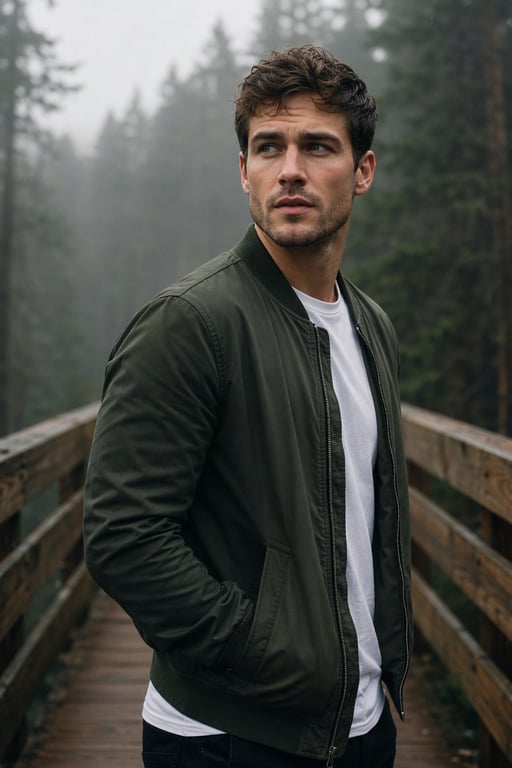
Choose your starting point
Upload a clear photo, or choose From text to invent a character.
STEP 2
Round eyes, flat colors, a favorite outfit, and a snowy town.
Describe your character
Use an example or add your outfit, expression and scene. Review the model and format.
STEP 3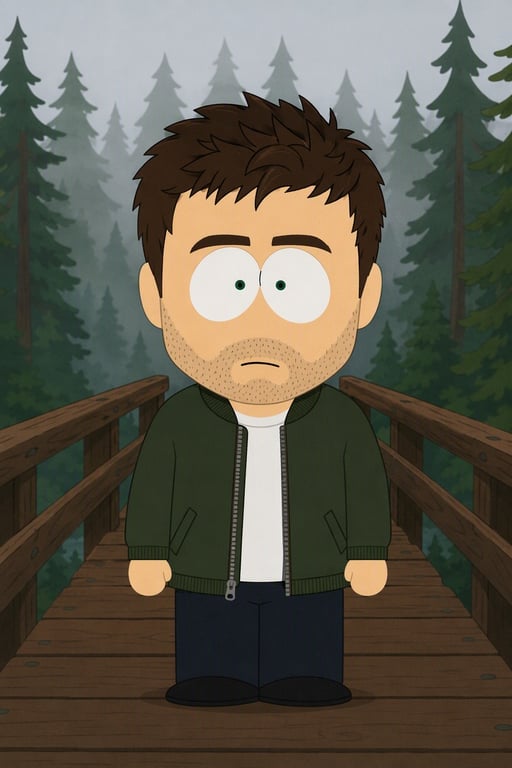
Generate and download
Generate when ready. Review the result, refine your idea, and download your favorite version.
A South Park character creator for profile pictures
Bring a bright cartoon avatar with a teal hoodie into a simple cartoon world. HeyPix lets you begin with a portrait or a written idea, then use the available image generator to develop the look. Think of the example cards as creative starting points: each Use button loads a prompt and, where available, its reference photo so you can make a new request with your own choices.
Design for the small size where an avatar will actually appear. A simple face, clear outline and uncluttered background usually make a stronger profile image than an elaborate full scene.
Choose between a photo and a written idea
From photo is useful when your starting point is an existing person, outfit or pose. Upload a clear image that you have permission to use, and describe which visible details matter to your profile pictures. A front-facing or gently angled portrait with a readable face gives you a more understandable reference than a crowded scene or a heavily obscured subject.
From text starts with an original description. State the character’s hair, clothing, expression and setting in plain language. You do not need a reference photo for this mode. Random prompt provides an editable idea when you want inspiration; selecting it prepares the text and leaves generation under your control. Review the model and settings before submitting.
Write a prompt that gives your character direction
For profile pictures, start with the person and the role they play. Describe the important silhouette, add two or three clothing details, choose an expression and name the location. You might begin with “a bright cartoon avatar with a teal hoodie, South Park style paper-cut cartoon, round expressive eyes, flat colors.” Adjust that brief to suit your own subject instead of keeping every detail from an example.
A South Park character maker works best as an iterative creative workflow. Keep the main description stable and change one detail at a time. If the background feels busy, ask for fewer objects; if the costume loses its identity, simplify the brief and emphasize its defining colors. Review each image rather than assuming a longer prompt will preserve every detail exactly.
Learn from the examples and photo comparisons
The example gallery gives you several different starting points, including café portraits, outdoor explorers and evening scenes. Use fills the generator without submitting a paid request. You can replace a supplied reference with your own photo, edit the suggested character description and choose a supported format. These authorized reference examples illustrate a direction; their appearance is not a promise that a new generation will reproduce them exactly.
Drag a comparison handle to inspect the original photograph and its cartoon interpretation. Look at clothing, facial features, background shapes and pose separately. The panels also move slowly back and forth when visible, while direct interaction pauses the motion. Keyboard users can focus the comparison and adjust it with the arrow keys. Use the text beside each pair to decide which details to carry into your own prompt.
Refine the result for profile pictures
Design for the small size where an avatar will actually appear. A simple face, clear outline and uncluttered background usually make a stronger profile image than an elaborate full scene. Before downloading, check the face at a useful size and inspect accessories, hands and any detail that matters to your intended use. Compare the image with your brief, then decide on the smallest change that would improve it. Saving your favorite prompt makes that next step easier.
Choose the output format for the place where the character will appear. A square image is a natural starting point for a profile picture; a portrait composition can show a full outfit; a wider image can give a scene more room. The available aspect ratios, resolution options and credit cost come from the selected model. Review those controls rather than assuming that every model has identical settings.
Explore characters, gaming themes and original worlds
People searching for South Park characters or Cartman South Park often want the familiar visual language: simple shapes, winter clothing, large round eyes and expressive faces. You can use those broad visual cues while giving your own character a distinct outfit and personality. Describe your idea directly and inspect the result for the details that matter to you. This creator is an independent tool and does not imply an official affiliation.
A South Park World of Warcraft inspired idea can combine a cartoon character with fantasy accessories such as a cloak, staff or backpack. Begin with one character and one setting rather than an elaborate battle scene. Keep the gaming theme focused on costume and environment, and use an original design when you want a personal avatar or story concept.
Frequently asked questions
How can I make my avatar readable at small sizes?
Use a close or waist-up composition, contrasting clothing and a simple background. Preview the downloaded image at its intended profile size before choosing it.
How do I use the South Park character creator?
Choose From photo or From text, prepare your reference or description, and review the available model and output settings. Generate when ready, inspect the image, and download your preferred result. For profile pictures, keep your first brief focused on a single subject and a simple scene.
What happens when I click Use on an example?
Use loads the example’s prompt and its reference photo when one is available. It returns you to the generator so you can replace the reference, edit the description and review the settings. It does not submit a generation or spend credits.
Can I create a character without uploading a photo?
Yes. Select From text and describe an original character. Include clothing, expression, framing and location. A brief about a bright cartoon avatar with a teal hoodie gives you a concrete starting point, and Random prompt can help when you want a different idea.
Will the cartoon look exactly like my photo?
A reference guides the image model, but exact identity, pose and background preservation are not guaranteed. Use a clear image, describe the features you care about and review the result. If necessary, simplify the prompt and request another version.
Is this South Park maker free to use?
You can browse examples and prepare your prompt before submitting. Generation availability and credit requirements depend on your account, the selected model and the current plan. Check the displayed cost and the Pricing page before starting a request.
Can I choose the image size and aspect ratio?
Use the supported format controls shown by the selected model. Available ratios and resolutions can differ across models and modes. Choose a composition for your intended use, then check the final image for crop-sensitive details before downloading.
Are the example prompts original generation records?
The gallery contains authorized reference material. Where the source did not provide an original prompt, an editable suggested prompt was prepared to help you explore a similar idea. A suggestion is not a verified record of how the reference image was generated.
How do I improve an image that misses important details?
Review the result against your profile pictures brief. Identify one missing feature, such as the outfit color or facial accessory, and revise that part of the description. Avoid combining several unrelated corrections into a single request.
Can I use the result for an avatar or post?
You can download a completed image and prepare it for your intended use. Check recognizable people, protected characters and the rights that apply to your project. Keep the face readable at the final display size and add any essential text in your usual editor.